Opinion: My Phone Defeated Me in the Middle of a Talk
My phone alarm went off in the middle of my KubeCon talk, and I could not make it stop. I keep well over a hundred coding agent sessions running on a box I never touch, and I ended up handing my phone to a friend in the front row so they could silence it.
It went off in the middle of tip three, which is about getting your agents off the devices you carry. The phone in my hand was the one device in the room I had not set up to run without me.
The talk was "A Hundred Agent Sessions on One Box: Tips for Running Coding Agents Remotely", a tip talk in the Learning Lounge at KubeCon + CloudNativeCon North America in Salt Lake City on Wednesday, November 11. The presentation and the deck are at https://tips.michaelrishiforrester.com, and the config excerpts are in https://github.com/peopleforrester/remote-agent-fleet-config. Here is what I said, with the numbers checked after the fact.
Coding agents do not belong on the device you carry
I am a big proponent of not running coding agents on end-user devices, especially in an enterprise. If you have a leftover personal access token somewhere on that file system, I promise you the agent is going to find it. Then you are asking how it archived a GitHub repo it had no permission to touch, and the answer is a token from a year ago that it found in your SSH directory. It was trying to make you happy.
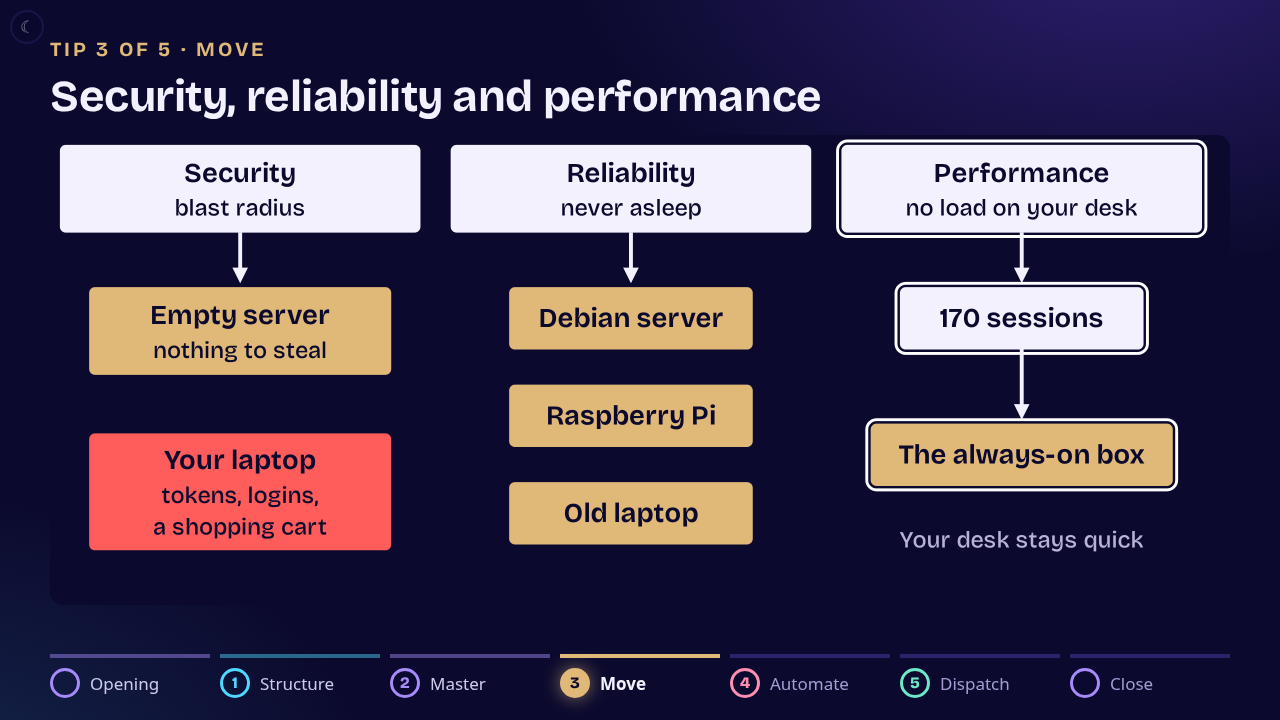
Security is the first reason. The second is the lid: once the agents are on another box, closing your laptop does not kill anything. The third is performance. Run 170 sessions on the laptop you read your email on and it chokes. I have typed faster than a Word document could show the letters because I had a GitHub runner going on my laptop for an agent.
The box does not have to be a server you buy. An old laptop on your home network will do.
This is my personal system, my agentic software factory, and the order of the five tips is the order I wish I had done it in.
1. Structure the work before you move it
Whatever is broken in your structure and your workflow gets copied onto the box you move to, and just like in production, it will not scale.
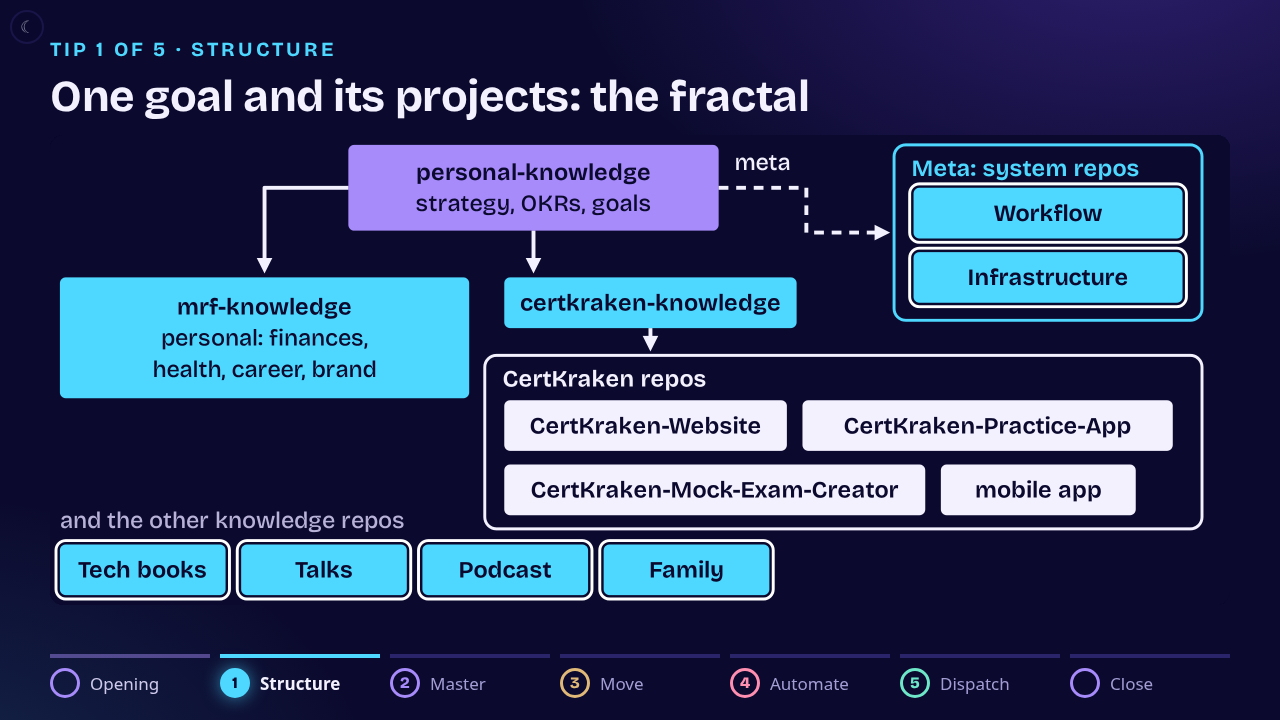
I have a strategic repo that holds my goals, personal and professional. It asks me questions (are you writing a book this year? taking certifications?) and from the answers it creates coordinator repos, and under those the worker repos that do the work. CertKraken, my practice exam hobby, is one goal: a website, a practice app, an exam trainer and a mobile app. Replicate that twenty times and you have my system.
2. Master one workflow before you run many
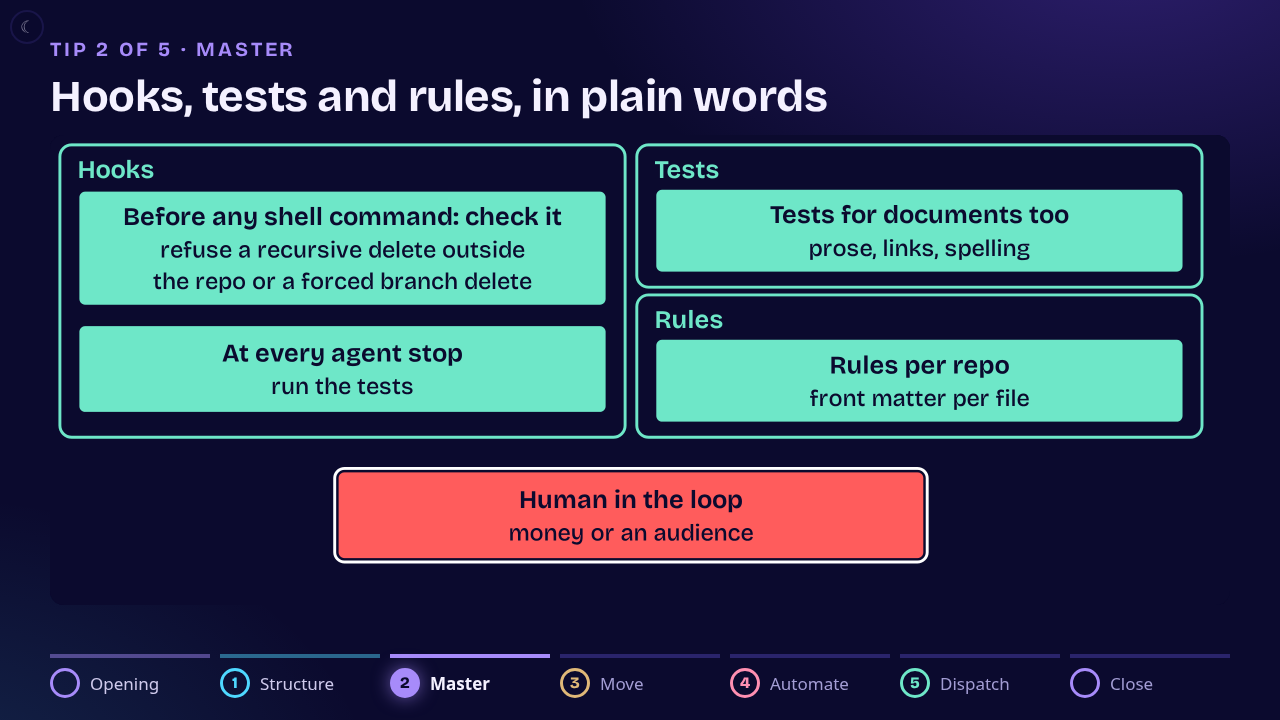
Start with one goal, not twenty. That one goal is where you work out your safety hooks, your test coverage and your CI/CD pipeline. Do not do what I did, which was start complex.
This is also where you decide when a human is in the loop. My rule: if it is going to spend money or publish to an audience, it talks to me first. I have let emails send once or twice, and I regretted it.
3. Move to one always-on box
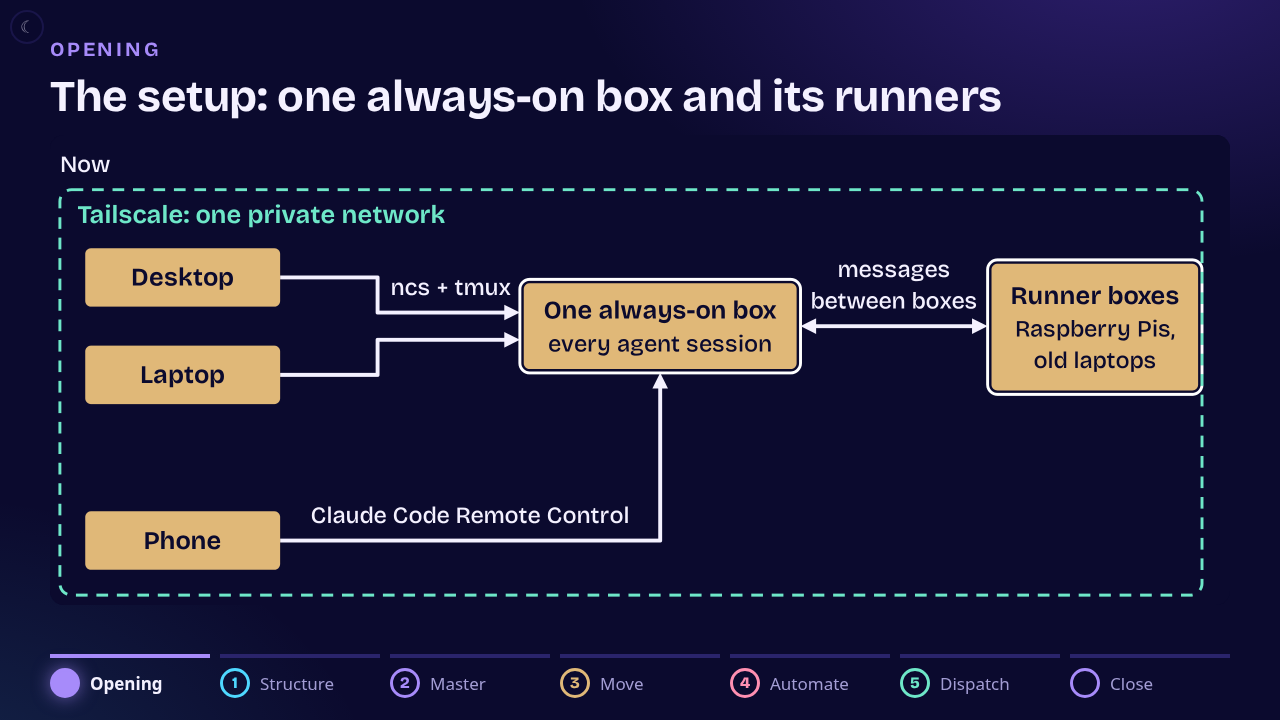
That is the case I made at the top, and this is where it lands. Desktop, laptop and phone all connect to one box on a private network, and that box holds every agent session. With Claude Code Remote Control I can pull out my phone and steer any project from it.
4. Automate your connections
I got tired of typing ssh every time I opened the lid and finding 150 sessions waiting for the same commands again. Now a small wrapper, ncs, keeps each tab attached to its tmux session on the box and reconnects by itself when the lid opens. A close and restore command shuts every terminal window and reopens them by group: all the book sessions together, all the CertKraken ones together. Some of you do this in production. It never occurred to me to do it with my personal system, and I highly recommend it.
5. Grow into a dispatcher
I used to cycle through sessions interactively, tell each one what to do, and let it run for a couple of hours. I do not do that anymore. My specs and tasks are GitHub issues in each repo, and a dispatcher, Hecaton, reads them and starts headless Claude Code sessions that work each issue and come back with a result. The result has to pass the tests and a set of reviewers (security, architecture, prose) before it merges. When a piece of work keeps failing, the dispatcher widens the tests, then moves to a stronger model, then splits the work.
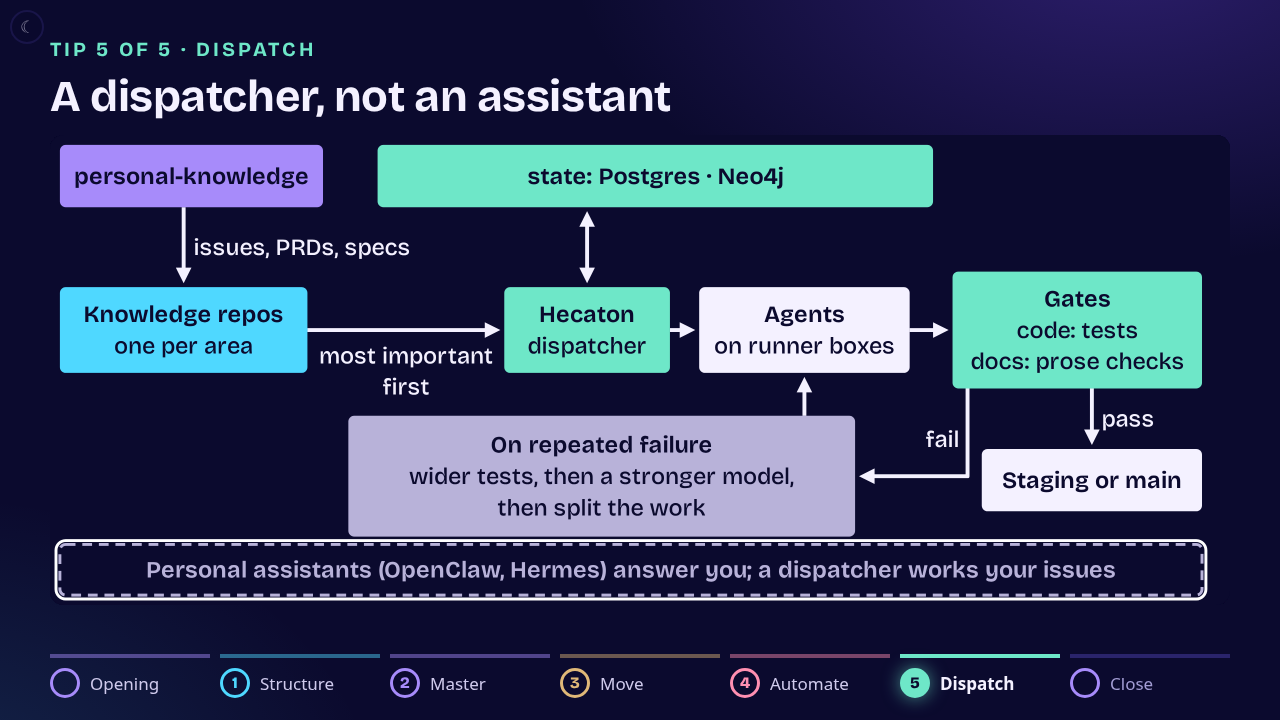
Someone asked in the Q&A how I work by hand next to it. When I open a repo myself, the first thing I tell the session is to tell Hecaton I am in there. Hecaton stops picking up that repo's issues until I leave, then takes the hold off. I can run several interactive sessions that way.
The numbers, checked after the talk
Some of what I said on stage was off. After the talk I had the figures checked against the dispatcher's records, and I would rather publish the checked numbers than repeat mine.
- Commits. More than 4,500 merged commits in 23 days, October 14 to November 5. I said 25 days.
- Runs. Those came from about 17,000 unattended runs of every kind (issue work, reviews, planning). I called the 17,000 commits. They were runs.
- Waste. About half of the runs that worked an issue did not merge: 4,524 of 8,518 did. I said three quarters. It is early days, and that is the number I am working to bring down.
- Subscriptions. Three $200-a-month Claude subscriptions, not the two I said, and the dispatcher draws on all three.
- CI. The heavy CI runs on the always-on box, a desktop and a laptop, not on the old hardware I described.
- Sessions. The box peaked at 170 tmux sessions in mid-October and ran about 90 in early November. The count moves every day.
Build software for your own workflow
I could publish my system as another assistant for you to install. I would rather you take the principles. Building software for your workflow is going to be far more valuable than adopting somebody else's.
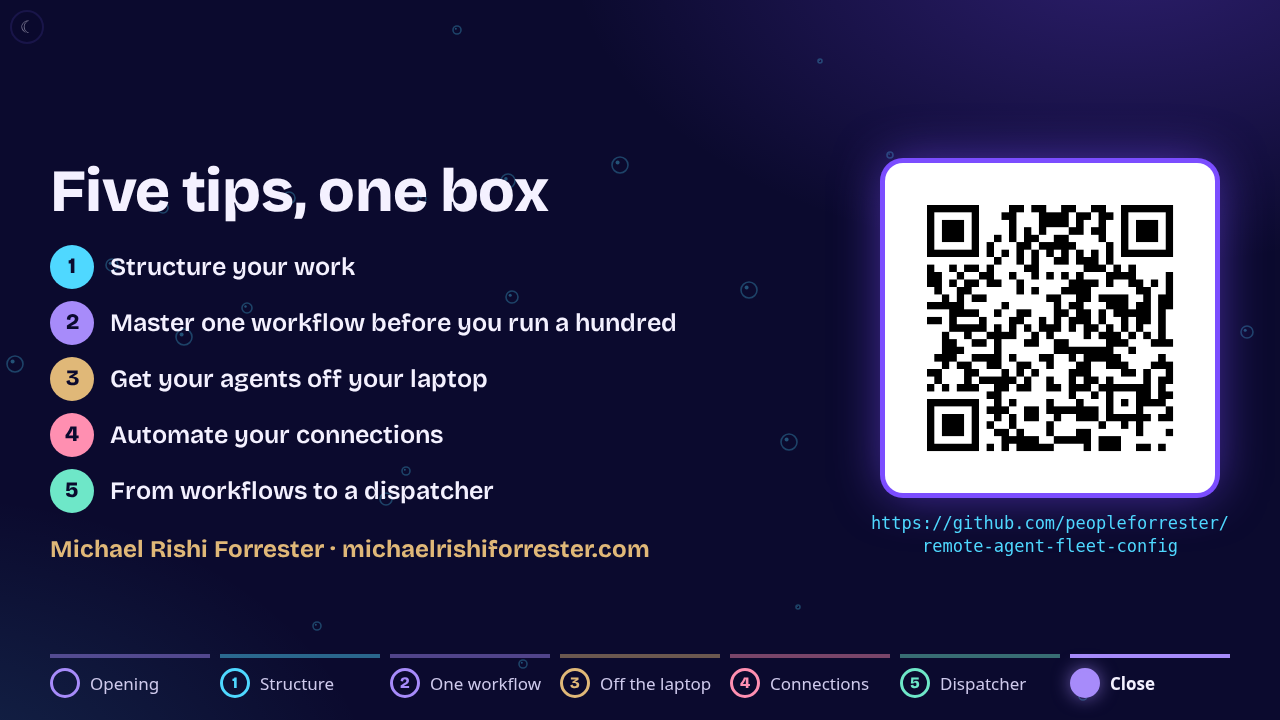
So start with one goal and one workflow, get it working with hooks, tests and a human in the loop for money and audiences, then move it to one always-on box and automate the way you connect to it. The dispatcher comes last. And set your phone to silent before you go on stage.
The deck is at https://tips.michaelrishiforrester.com/deck/ and the configs are at https://github.com/peopleforrester/remote-agent-fleet-config.